Platform / Authoring
Build a custom front end in code, with your AI coding agent
When you want a fully custom configurator or engineering app (your own framework, your own components, deeper integration), you build it in code against the ShapeDiver Viewer API. ShapeDiver Agent Skills give your AI coding agent expert knowledge of that API, so it writes production-ready ShapeDiver code without guessing from the docs. The skills are open source and work with the coding agent you already use.
Open source. Works with GitHub Copilot, Claude Code, Cursor, and more.
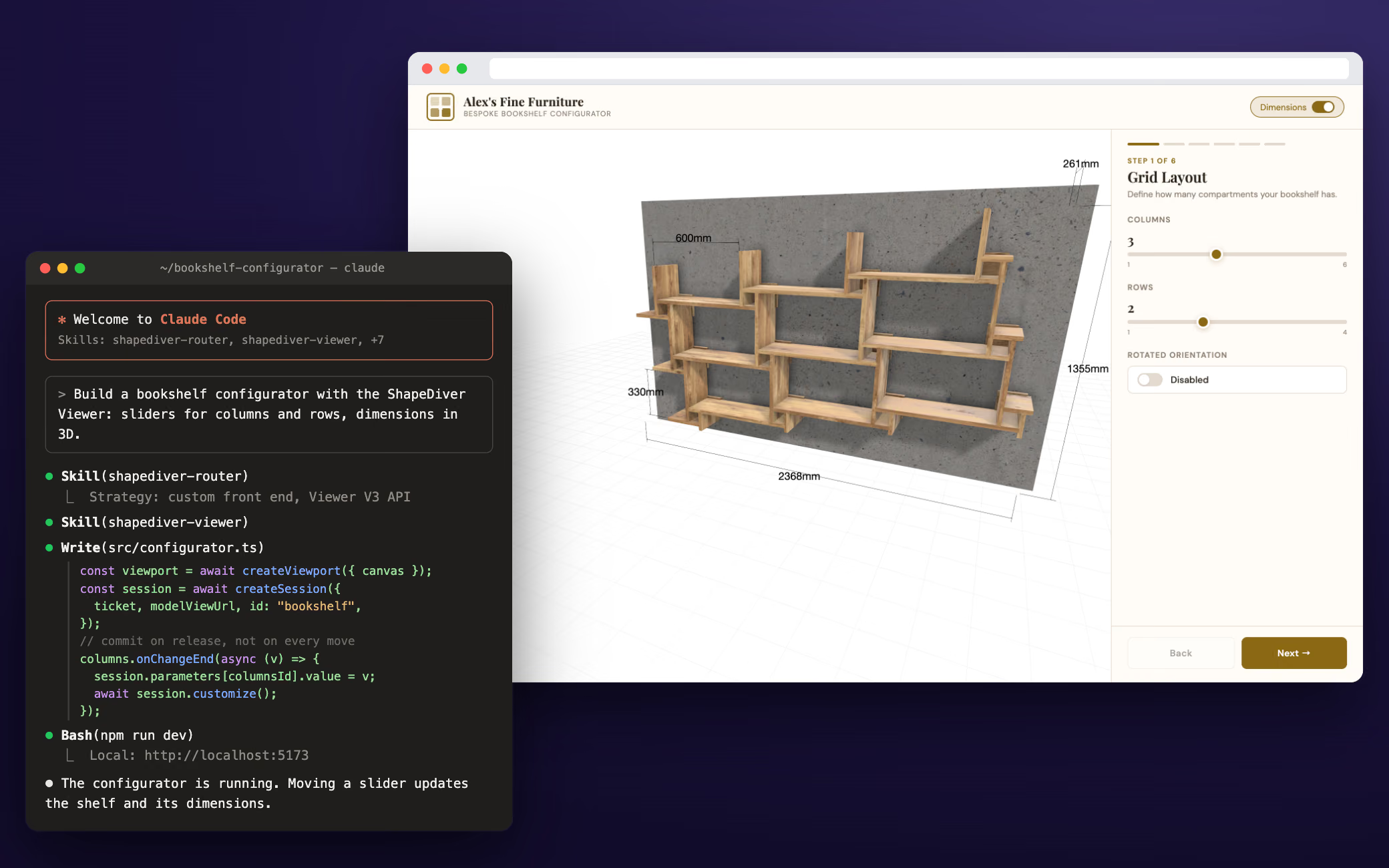
What it is
Expert ShapeDiver knowledge, inside your coding agent
Agent Skills are a standardized way to give an AI coding assistant detailed knowledge of ShapeDiver. Instead of your agent piecing an integration together from scattered API docs, it loads the right ShapeDiver skill for the task and writes code that follows our patterns. They’re open source, and they work with any assistant that supports the open Agent Skills standard - GitHub Copilot, Claude Code, Cursor, Codex, Gemini CLI, and others. This is the code route to a ShapeDiver front end: you and your agent build directly against the Viewer API, with full control over the framework, the components, and how the app fits into the rest of your stack.
How it works
A router that finds the right path
The skills use progressive disclosure - your agent knows the ShapeDiver skills exist but loads the detail only when it’s relevant. A router skill goes first: it asks what you’re building and points to the right implementation skill from there. That covers the range: a custom 3D configurator on the Viewer API, embedding or theming an App Builder app, forking the open-source App Builder React app to add your own components, or a server-side integration through the platform and geometry backends. You install them with a single command, and they sit alongside your agent’s other skills.
$ gh skill install shapediver/agent-skills
When to use it
Code when you need it, no-code when you don’t
Agent-assisted build is the developer route, and it isn’t the only one. Reach for it when you need a fully custom front end, your team’s own framework, or deeper integration than a configured UI allows - the Viewer API gives you complete control. When you’d rather not write code, App Builder builds the interface from Grasshopper components with no development at all, and it’s the faster path for most cases. The two aren’t exclusive: the Agent Skills can also embed, theme, or fork an App Builder app, so you can start no-code and drop into code exactly where you need more.
See App Builder
Not the same as AI inside your app
Building with AI vs. AI in the app
This page is about building with AI - a coding agent that helps you write the front end. That’s different from ShapeDiver’s in-app AI agent (an early preview), which lets the people using your app change a model by describing what they want. If that’s what you’re after, the AI page has that story.
See the AI storyWhere it fits
One part of how an app comes together
Agent-assisted build is a way to build the front end (the delivery side). The model behind it is authored in Grasshopper with the ShapeDiver plug-in and uploaded to the platform, which hosts and computes it. In the browser, the ShapeDiver Viewer, a JavaScript application, talks to the platform’s backends to fetch and update geometry and renders it; the Viewer API is how your code drives that viewer. Your workspace on the platform is where you manage, version, and share the model and control who can access it. From there, your custom front end runs wherever you deploy it - your own site or app, on your own stack.

Agent-assisted build
Point your agent at ShapeDiver
Install the Agent Skills, start a free trial, and have your coding agent build a ShapeDiver front end against the Viewer API. The docs and the skill repository have everything it needs.